
How to gift digital games on Switch and Switch 2 (Nov 2026)
Nintendo eShop gifting is here: how to send a digital Switch or Switch 2 game to a family group member, who can receive it, the limits and what you need first.
Checked and updated 17 November 2026 at 03:00 UTC
Key points
- You can now gift digital games, DLC and upgrade packs from Nintendo eShop on Switch and Switch 2, but only to members of your Nintendo Account family group (up to 8 people).
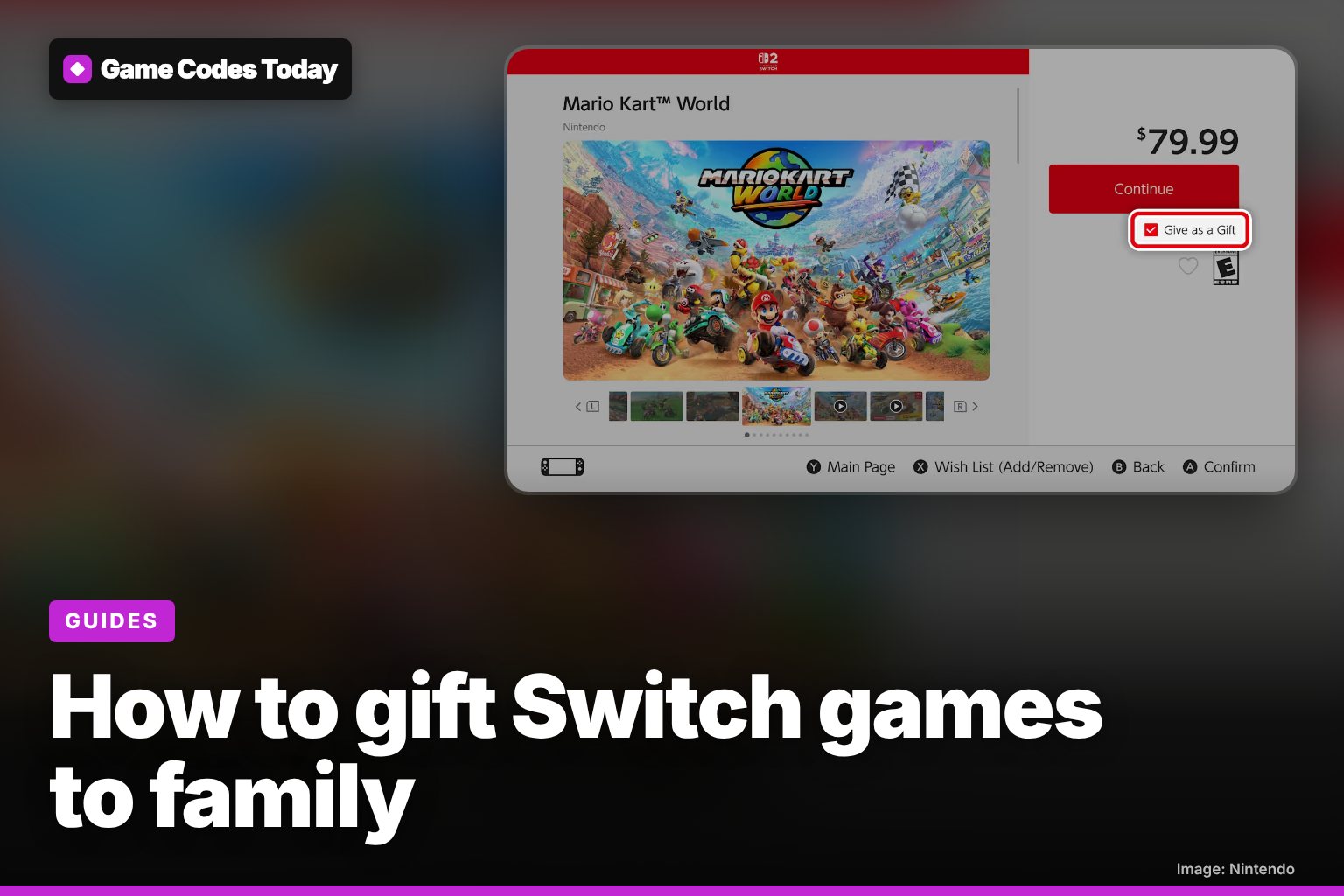
- Tick Give as a Gift on the game's eShop page, pick the family member and which of their consoles gets it, choose a gift wrap colour and pay. The gift arrives on their HOME Menu straight away.
- Both consoles need system version 23.5.0 or later. Supervised (child) accounts can't send gifts, some products can't be gifted, and there's a limit on how many gifts you can buy in a set period.
You can now gift a digital game on Nintendo Switch and Switch 2: open the game's Nintendo eShop page, tick Give as a Gift, pick a member of your family group and pay as usual. The catch is that gifts only go to people in your Nintendo Account family group, not to any friend.
Nintendo announced the feature on November 9 and said it would arrive on November 16, just in time for the holidays. It works on both consoles, for games, DLC and upgrade packs.
Before you start
- Update both consoles to 23.5.0. Nintendo says gifting needs system version 23.5.0 or later, released on November 9. It should download by itself. You can also check your version and start the update yourself from System Settings.
- Be in the same family group. Anyone with a Nintendo Account can set up a family group with up to 8 members in total. The recipient has to be in yours.
- Use an adult account. Supervised accounts can't send gifts.
- Check the date. The 23.5.0 update notes say the eShop update that turns gifting on is scheduled for November 17. If the checkbox isn't there yet, try again later in the day.
How to send a gift, step by step
- Open Nintendo eShop on your Switch or Switch 2 and find the game you want to give.
- On the product page, tick the Give as a Gift box under the price, then press Continue.
- On "Who would you like to send this gift to?", pick the person from Your Family Group Members.
- Choose which of their linked consoles should get it.
- Pick a gift wrap colour. Nintendo's screenshots show eight: red, orange, yellow, green, light blue, blue, purple and pink.
- Finish the purchase as normal.
The gift is sent the moment you pay. Nintendo says so directly, so don't buy a birthday present a week early and expect it to stay hidden.
What the person receiving it sees
The gift shows up as a wrapped box at the front of their HOME Menu, labelled "A Gift for" and their name. Opening it shows who it's from, with Accept and Later buttons. After they accept, a "You received software!" screen appears and the game is theirs to download and play. They don't need payment details or a download code.
Limits and catches
| Rule | What it means |
|---|---|
| Family group only | No gifting to friends outside your group (max 8 members) |
| Some products can't be gifted | Nintendo doesn't list which. If the Give as a Gift box is missing on a product page, that item isn't eligible |
| Gift limit | You can only buy a limited number of gifts in a given period. Nintendo hasn't said what the number is |
| Supervised accounts | Can receive gifts but can't send them |
| Instant delivery | No scheduling. The gift arrives as soon as you pay |
The family-only rule is the big one. It's built for parents buying games for their kids' accounts, rather than for sending a game to a friend across the country. For anyone outside your group, a Nintendo eShop gift card is still the way to go.
Good timing for Black Friday
Gifting arrives just as the holiday sales start, so you can pick up a discounted game in the eShop and send it straight to a child's Switch 2 without sharing your password or card. Our Nintendo Black Friday 2026 page tracks the console and game deals. If you're gifting Minecraft on Switch 2, we also have a guide to its new mouse controls.
Game Codes Today is not affiliated with Nintendo.
Frequently asked questions
Can you gift a digital game on Nintendo Switch to a friend?
Not yet. Nintendo's new eShop gifting only works between members of the same Nintendo Account family group. To gift to someone else, you'd have to add them to your family group first (up to 8 members), or buy a Nintendo eShop gift card instead.
When did Nintendo eShop gifting start?
Nintendo said the feature would be added on November 16, 2026. The 23.5.0 update notes say the eShop update that switches it on is scheduled for November 17, so if you don't see the Give as a Gift box yet, check again a day later and make sure your console is on 23.5.0.
Why can't my child send a gift on Switch?
Supervised accounts, the ones a parent manages in a family group, aren't allowed to send digital gifts. They can still receive them.
Sources
Related
Minecraft Switch 2 mouse controls: when Joy-Con 2 mouse mode arrives
Minecraft on Switch 2 is getting Joy-Con 2 mouse controls. What's in the beta now, the button layout, release timing and the free upgrade deadline.
Nintendo Black Friday 2026 deals: Switch 2 bundle and dates
Nintendo's official Black Friday 2026 deals. Switch 2 Mario Kart World bundle for $499.99 from November 22, $20 off seven games, eShop sale dates.
Pokémon Champions Mystery Gift codes (November 2026)
The working Pokémon Champions code is LA1CTRA1N1NG27 for 2 Training Tickets, until Nov 22. Plus how to get Pero's Sylveon on Twitch this weekend.